
WhatsApp via Uazapi
Uazapi is a Brazilian provider that also exposes WhatsApp through a REST API, in both self-host and managed models. SquadOS connects to your Uazapi instance with a base URL + token, and the QR code is scanned inside Uazapi’s dashboard (not here).
When to use
Section titled “When to use”| Use Uazapi when | Don’t use when |
|---|---|
| You already host Uazapi or use their managed service | Starting from scratch with no preference — evaluate Z-API or Cloud API |
| You need more server flexibility (self-host) | You don’t have a team to keep the server running |
| You have medium volume with tolerance for occasional drops | Critical support where downtime becomes an incident |
Prerequisites
Section titled “Prerequisites”Before you connect:
- A running Uazapi instance, either on their service (e.g.
https://free.uazapi.com) or self-hosted. - Base URL of your instance (no trailing slash):
https://free.uazapi.com,https://uazapi.yourdomain.com, etc. - Instance token — generated in Uazapi’s dashboard.
The WhatsApp QR code is scanned in Uazapi’s dashboard, not in SquadOS. SquadOS only polls the instance status and sends/receives messages.
Step by step
Section titled “Step by step”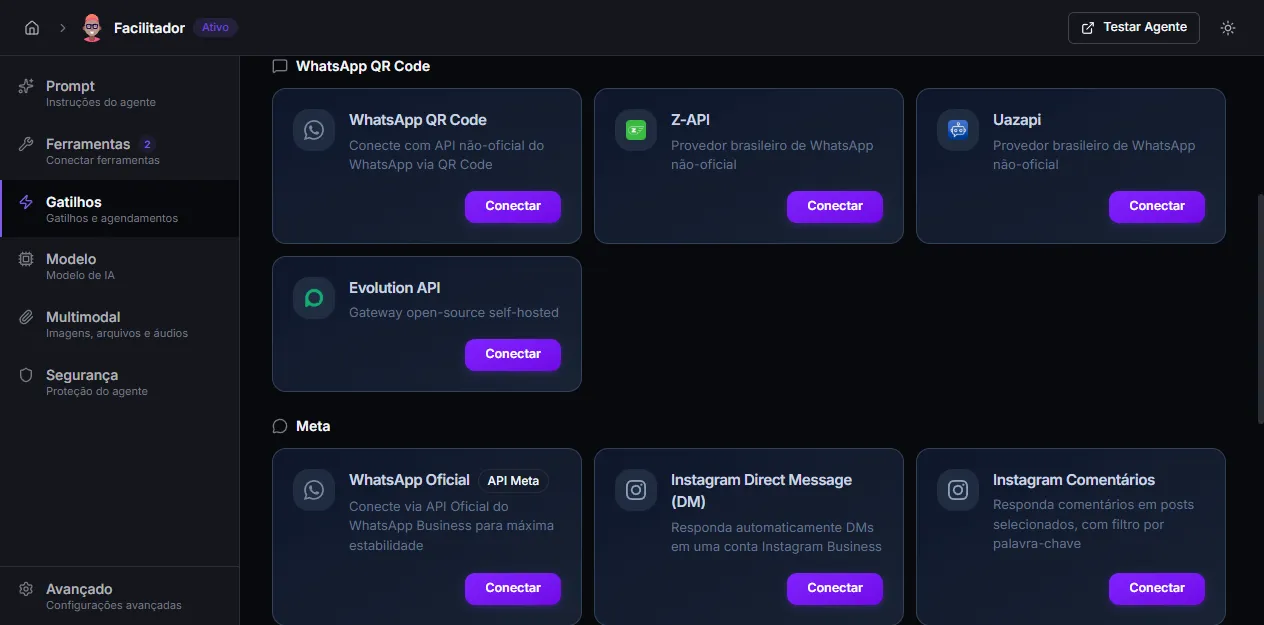
-
Open Admin → Agents → [your agent] → Triggers.
-
On the Uazapi card (inside the WhatsApp QR Code section), click Connect.
-
Fill in:
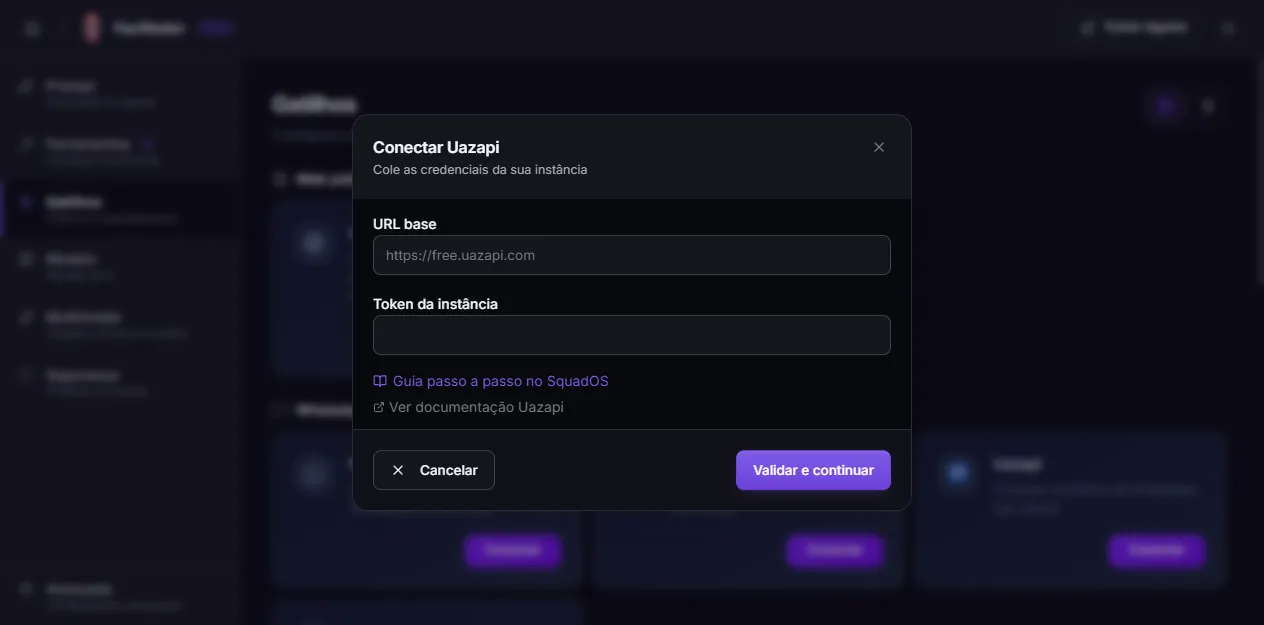
- Base URL — your instance base (e.g.
https://free.uazapi.com). - Instance token — token generated on the dashboard.
- Base URL — your instance base (e.g.
-
Click Validate and continue. SquadOS calls
GET /instance/statuson your Uazapi — if the token is wrong, the modal shows the error. -
The next step displays the webhook URL generated by SquadOS and the exact configuration sequence Uazapi’s dashboard requires. Copy the URL and, on Uazapi’s panel (the Webhooks button on the instance):
- Paste the URL into the Webhook URL field and keep the method as POST.
- Keep addUrlEvents and addUrlTypesMessages off.
- Under Listen to events, add only:
messages. - Under Exclude from listened events, add:
wasSentByApiandisGroupYes. - Toggle Enabled and click Save.
- Connect WhatsApp by scanning the QR code inside Uazapi’s dashboard (not in SquadOS).
-
Back in SquadOS, click I’ve configured the webhook.
-
SquadOS calls
/instance/statusto verify. If Uazapi reports statusconnected, the card switches to Connected and the number appears (extracted from theownerfield Uazapi returns).
If verification fails, open Uazapi’s dashboard, confirm the status is connected (and that you scanned the QR there) and click Check again.
Why these specific webhook filters?
Section titled “Why these specific webhook filters?”The configuration in step 5 isn’t decoration — it’s what makes the integration work:
messagesis the only event SquadOS parses. Other events would be answered withOK - other event(ignored) but would still hit the webhook and create useless noise.wasSentByApifilters out messages the agent itself just sent — without this, the agent’s reply would come back through the webhook and the agent would reply to its own reply, in a loop.isGroupYesfilters group messages. SquadOS doesn’t respond in groups today; letting them through wastes processing.addUrlEventsandaddUrlTypesMessagesoff keep the webhook URL static (no dynamic suffixes), which is what SquadOS expects to validate thewebhook_secret.
If messages aren’t arriving, review this configuration first before anything else.
How it works
Section titled “How it works”- SquadOS does not host the WhatsApp session — it lives on your Uazapi instance.
- Messages come in via webhook, become conversations in SquadOS, and the agent replies via
POST /send/texton Uazapi. - Media (images, audio, documents) is sent via
POST /send/media.
Editing credentials later
Section titled “Editing credentials later”If the token expired or you changed the base URL, open the connected Uazapi card, click info and edit. SquadOS revalidates against Uazapi before saving; if it fails, the previous set is kept.
The webhook URL does not change — it’s fixed per agent.
Disconnecting
Section titled “Disconnecting”On the connected Uazapi card, click Disconnect. SquadOS calls POST /instance/disconnect on Uazapi and marks the trigger as inactive. The instance itself keeps existing on Uazapi’s dashboard.
Troubleshooting
Section titled “Troubleshooting”- “Invalid credentials” at step 1. Check the base URL (no trailing slash, with
https://) and the token. If Uazapi responds 401/403, this error shows up. - Webhook configured but no messages arriving. The most common culprit is the event configuration on the webhook. Go back to Uazapi’s panel and confirm step 5 above item by item — especially that only
messagesis selected and thatwasSentByApiis in the excluded list. - Agent replies to its own reply in a loop. It means
wasSentByApiis not in the excluded events. Fix it on Uazapi’s panel. - Group messages arriving.
isGroupYesis not in the excluded list. SquadOS already filters groups on its side, but excluding at the webhook level cuts useless traffic. - Status stays “disconnected” forever. You need to scan the QR code on Uazapi’s dashboard — SquadOS does not show the QR for this provider (Uazapi manages the session there).