
Triggers Overview
A trigger defines where the message that activates your agent comes from. A single agent can have several triggers active at the same time — for example, serve users via the public URL, on Telegram, and via API simultaneously, all using the same prompt and the same tools.
To set them up, open the agent in the admin panel and go to Triggers (sidebar of the agent editor).
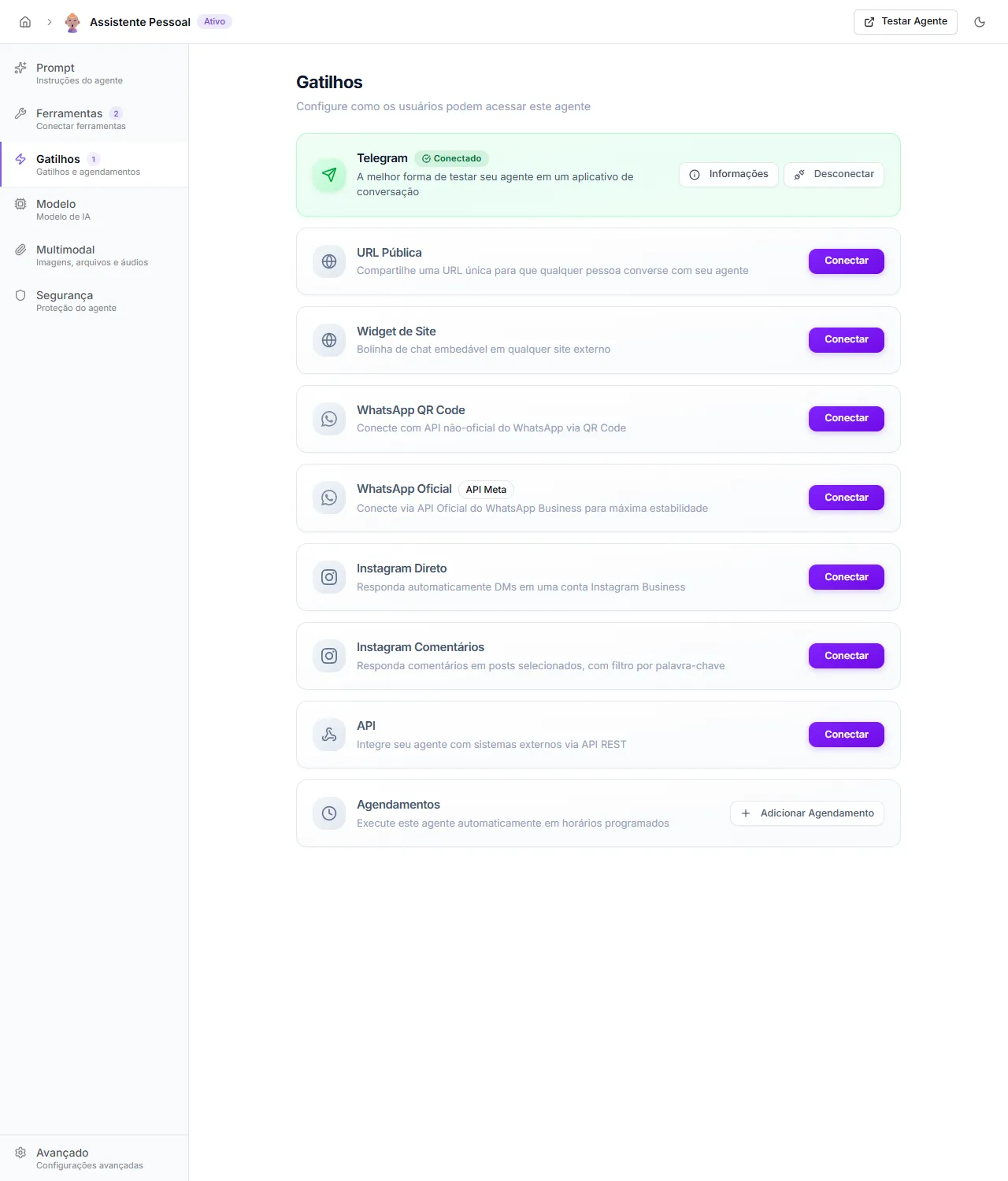
Available triggers
Section titled “Available triggers”- Public URL — single link
squados.io/a/<slug>that anyone can use to chat with the agent without signing in. See Public URL and Widget. - Site Widget — embeddable chat bubble for any external site via snippet. See Public URL and Widget.
- Telegram — Telegram bot connected to the agent. Useful for quick testing in a messaging app and for personal automations. See Telegram.
- WhatsApp Official (Cloud API) — Meta’s Cloud API. Recommended for production. Stable, with SLA and official rate limits. See WhatsApp Official.
- WhatsApp QR Code — unofficial connection via QR Code managed by SquadOS itself. Use only for testing — it can disconnect at any time. See WhatsApp.
- WhatsApp via Z-API — connects the agent to a Z-API instance you manage on their account. SquadOS only uses the credentials and webhook. See Z-API.
- WhatsApp via Uazapi — connects to a Uazapi instance (managed or self-hosted). See Uazapi.
- WhatsApp via Evolution API — open-source gateway you run on your own server. Use when you need full control over the infrastructure. See Evolution API.
- API (Webhook) — REST endpoint that external systems (n8n, CRM, your own backend) can call to send messages to the agent. See API (Webhook).
- Schedules — runs the agent at fixed times (daily, weekly, monthly), optionally delivering the response to another connected channel. See Schedule.
- Instagram Direct (DM) — auto-replies DMs on an Instagram Business account. Beta feature, available only for superadmin. See Instagram Direct.
- Instagram Comments — replies to comments on selected posts, with keyword filters. Beta feature, available only for superadmin. See Instagram Comments.
The Hub (route /hub) is the panel where authenticated collaborators talk to agents of their organization. It is not a separate trigger — it is the default internal environment and does not require configuration in the Triggers card.
How to choose
Section titled “How to choose”- Want to try a new agent fast? Open the Hub or connect to Telegram.
- Going to serve customers at scale on WhatsApp? WhatsApp Official.
- Want to expose the agent to the general public? Public URL (direct link) or Site Widget (embed in your own page).
- Need the agent to run autonomously on a schedule? Schedules.
- Have an external system (n8n, CRM, your own backend) that will call the agent? API (Webhook).
Multiple triggers on the same agent
Section titled “Multiple triggers on the same agent”It is common to use more than one trigger at once. For example, the same agent can serve customers on WhatsApp Official, run every day at 8 AM via Schedule to generate an internal report, and be invoked through API from your CRM. Each channel keeps its own conversation history per contact.