
Models
The model defines which AI generates the agent’s responses. In SquadOS, the choice affects quality, speed, cost, support for tools, images, files, and reasoning.
Model tab
Section titled “Model tab”In the agent editor’s Model tab you see three quick shortcuts at the top and the full model list below. On the right, a panel details the selected model with context window, output limit, credit cost per 1k tokens (input and output), and description.
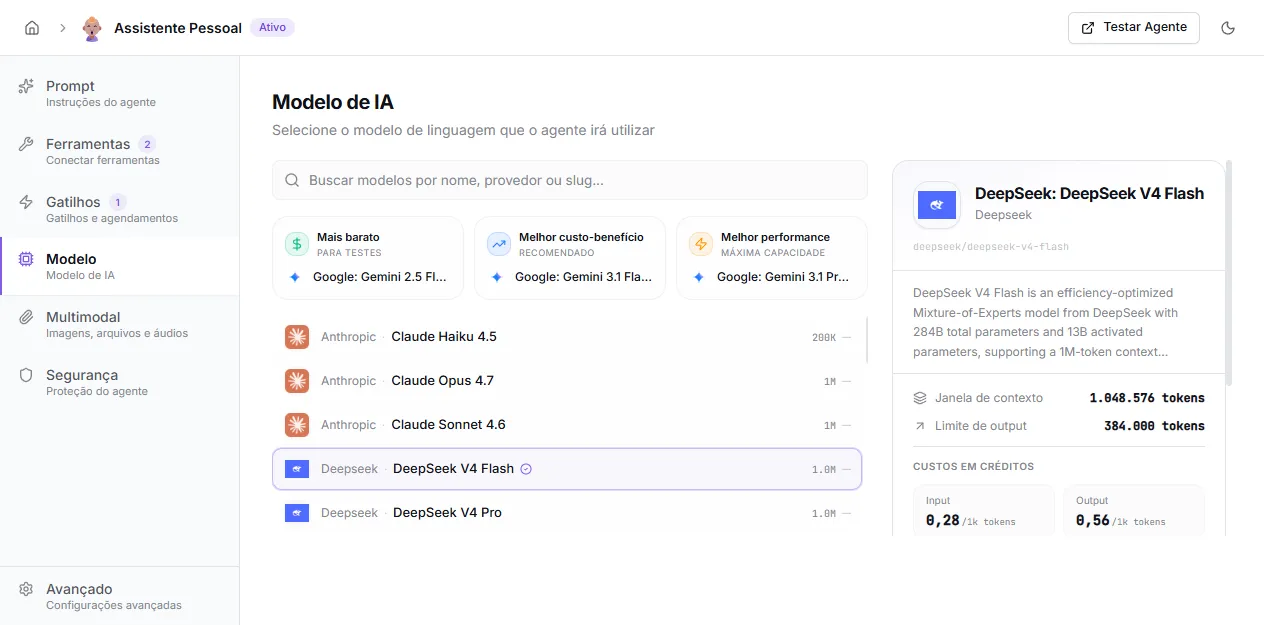
Quick shortcuts
Section titled “Quick shortcuts”SquadOS highlights three options at the top of the screen to speed up the choice:
- Cheapest — for testing: simple agents, high volume, prototyping.
- Best value — recommended: balanced option for general use. Pre-selected on new agents.
- Best performance — maximum capacity: complex tasks, multi-step reasoning, long context.
The composition of these shortcuts comes from the models available to your organization and can change when the SquadOS team updates the model table.
Full list
Section titled “Full list”Use the Search models by name, provider, or slug field to filter. The list shows the provider (Anthropic, OpenAI, Google, DeepSeek, etc.), model name, and context window size. One click selects — no need to manually save; the choice persists automatically.
Details panel
Section titled “Details panel”When you select a model, the right side panel shows:
- full name, provider, and slug (technical identifier);
- model description;
- context window (input tokens);
- output limit (tokens per response);
- credit cost per 1k tokens (input and output);
- icons indicating whether the model supports vision (image) and files.
Each conversation turn is billed by tokens sent (input) + tokens generated (output). Knowledge bases, long history, and extensive prompts increase input.
When the organization uses its own OpenRouter key (BYOK), the text call cost becomes 1 fixed credit per turn — useful for high volumes and premium models. Set it up in Settings → AI Models → OpenRouter API Key.
To reduce cost without switching the model, adjust in Advanced:
- History limit: fewer messages loaded per turn.
- Tokens per response limit: forces shorter answers.
- Multimodal: use preprocessing with a cheap model for reading images, instead of loading everything into the main model.
Tool support (tool calling)
Section titled “Tool support (tool calling)”Practically all modern models in the list support tool calling (function calling) — required for native tools, custom HTTP, and integrations. If the Tools tab shows odd behavior (the AI never calls tools), confirm the selected model supports tools.