
WhatsApp via Evolution API
Evolution API is an open-source WhatsApp gateway you run on your own server (or dedicated hosting). It’s the preferred path when you want full control over the infrastructure — you host it, and SquadOS just talks to your instance over REST.
When to use
Section titled “When to use”| Use Evolution when | Don’t use when |
|---|---|
| You want to host everything — DB, queue, session — on your own server | You don’t have a team to stand up and maintain a 24/7 server |
| You need to customize behavior that managed providers don’t allow | You want to start fast without operating infrastructure — Z-API/Uazapi/Cloud API are faster |
| You already have Evolution running for other integrations | You’re evaluating WhatsApp for the first time |
Prerequisites
Section titled “Prerequisites”Before you connect:
- Evolution API running on an internet-reachable server (HTTPS). SquadOS needs to reach the public URL to call the API.
- Instance created inside Evolution Manager, with a defined
instance_name. - API Key for that instance (also called apikey in Evolution’s headers).
The WhatsApp QR code is scanned in Evolution Manager, not in SquadOS. SquadOS only polls the instance state and sends/receives messages via API.
Step by step
Section titled “Step by step”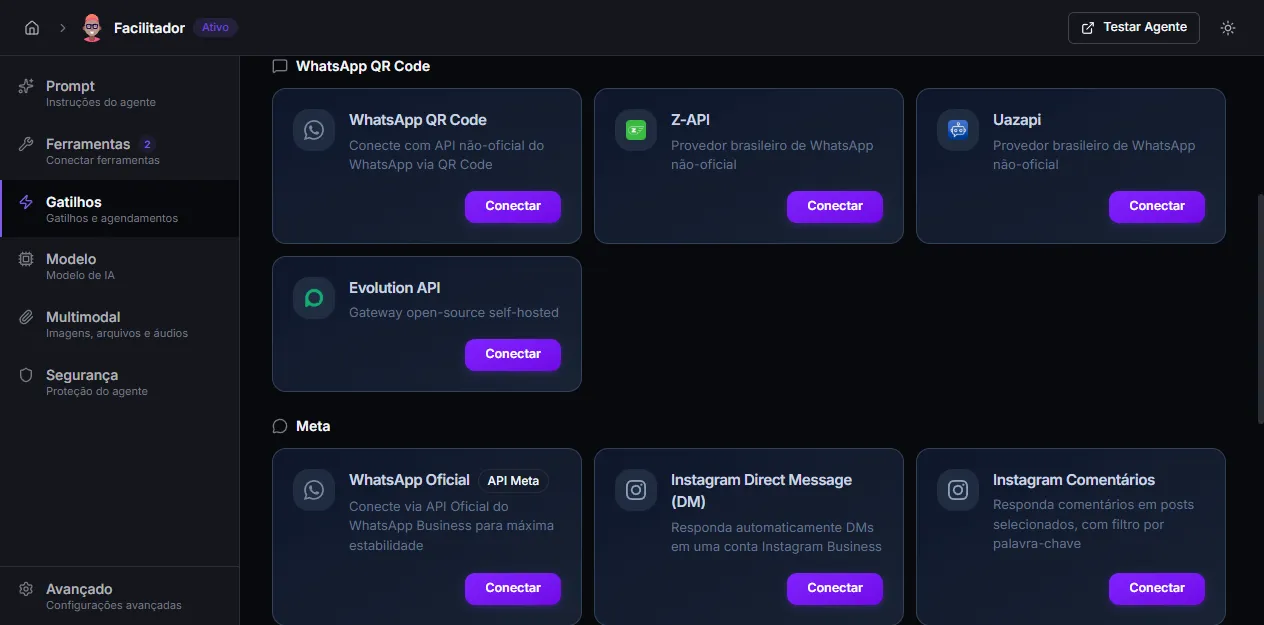
-
Open Admin → Agents → [your agent] → Triggers.
-
On the Evolution API card (inside the WhatsApp QR Code section), click Connect.
-
Fill in:
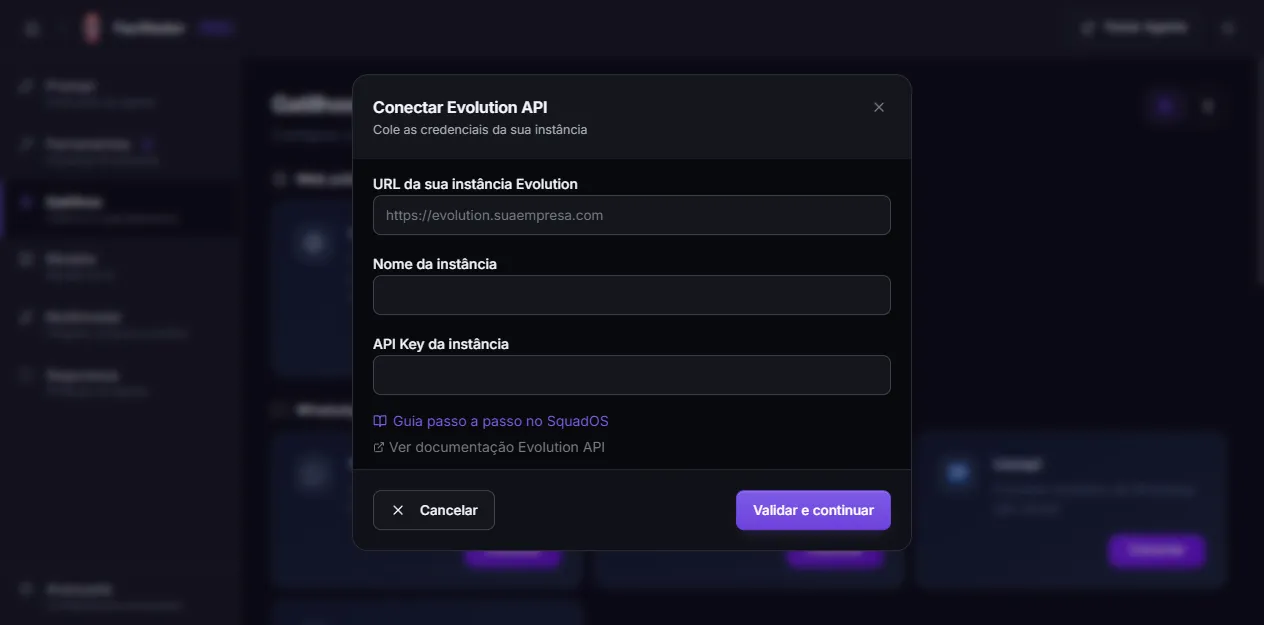
- Evolution instance URL — Evolution base (e.g.
https://evolution.yourcompany.com). - Instance name — the
instance_nameyou created in Evolution Manager. - Instance API Key — the apikey for that specific instance.
- Evolution instance URL — Evolution base (e.g.
-
Click Validate and continue. SquadOS calls
GET /instance/connectionState/<instance_name>on your Evolution. Possible errors at this step:401/403→ wrong API Key → “invalid credentials”.404→ instance doesn’t exist at that URL → “instance not found”.- Other HTTP codes → network error / Evolution offline.
-
The next step shows the webhook URL generated by SquadOS and the configuration walkthrough for Evolution Manager. Copy the URL and, in Evolution Manager:
- Open the instance you just registered.
- Go to Settings → Webhook (or Events) for the instance.
- Paste the URL in the Webhook URL field and keep the method as POST.
- Under events, check only
messages.upsert. - Save the webhook configuration.
- Connect WhatsApp by scanning the QR code inside Evolution Manager (not here).
-
Back in SquadOS, click I’ve configured the webhook.
-
SquadOS calls
/instance/connectionState/<instance_name>to verify. When Evolution returnsstate: open, the card switches to Connected and the number appears (fetched via/instance/fetchInstances).
If verification fails, open Evolution Manager, confirm the instance state is open (scan the QR there) and click Check again.
Why only messages.upsert?
Section titled “Why only messages.upsert?”Evolution’s webhook supports several events (connection.update, presence.update, qrcode.updated, etc.), but SquadOS only processes messages.upsert. Any other event is dropped with OK - other event — so checking more events only generates wasted traffic and processing. Keep only messages.upsert selected.
How it works
Section titled “How it works”- SquadOS does not host the WhatsApp session — it lives on your Evolution.
- Messages arrive via webhook (event
messages.upsert), become conversations in SquadOS, and the agent replies viaPOST /message/sendText/<instance_name>on Evolution. - Media is sent via
POST /message/sendMedia/<instance_name>. - Groups (
@g.us) and messages withfromMe: trueare filtered on the SquadOS side — but it’s still worth filtering them in Evolution to cut traffic.
Editing credentials later
Section titled “Editing credentials later”If the API Key was rotated or you changed the base URL (server migration, domain swap), open the connected Evolution card, click info and edit. SquadOS revalidates against Evolution before saving; if it fails, the previous set is kept.
The SquadOS webhook URL does not change — it’s fixed per agent.
Disconnecting
Section titled “Disconnecting”On the connected Evolution card, click Disconnect. SquadOS calls DELETE /instance/logout/<instance_name> on Evolution and marks the trigger as inactive. The instance itself stays on Evolution Manager — to delete permanently, use the Manager.
Troubleshooting
Section titled “Troubleshooting”- “Invalid credentials” at step 1. Wrong API Key or missing
apikeyheader. Check in Evolution Manager which apikey belongs to that instance (it’s per-instance, not global). - “Instance not found”. The typed
instance_namedoesn’t exist on that base URL. Check spelling (case-sensitive) and that the URL points to the right Evolution. - Webhook configured but no messages arriving. In Evolution Manager, confirm
messages.upsertis checked and that the webhook is enabled. Confirm the public Evolution URL is reachable by SquadOS (no firewall blocking the Supabase egress IP). - Status stays “close” forever. You need to scan the QR code in Evolution Manager — SquadOS does not show the QR for this provider.
- Duplicate messages / agent replying to itself. Check whether Evolution is sending messages with
fromMe: trueon the webhook. SquadOS already filters those, but if it happens in a loop there may be a problem with the webhook event configuration.