
AgentMaker
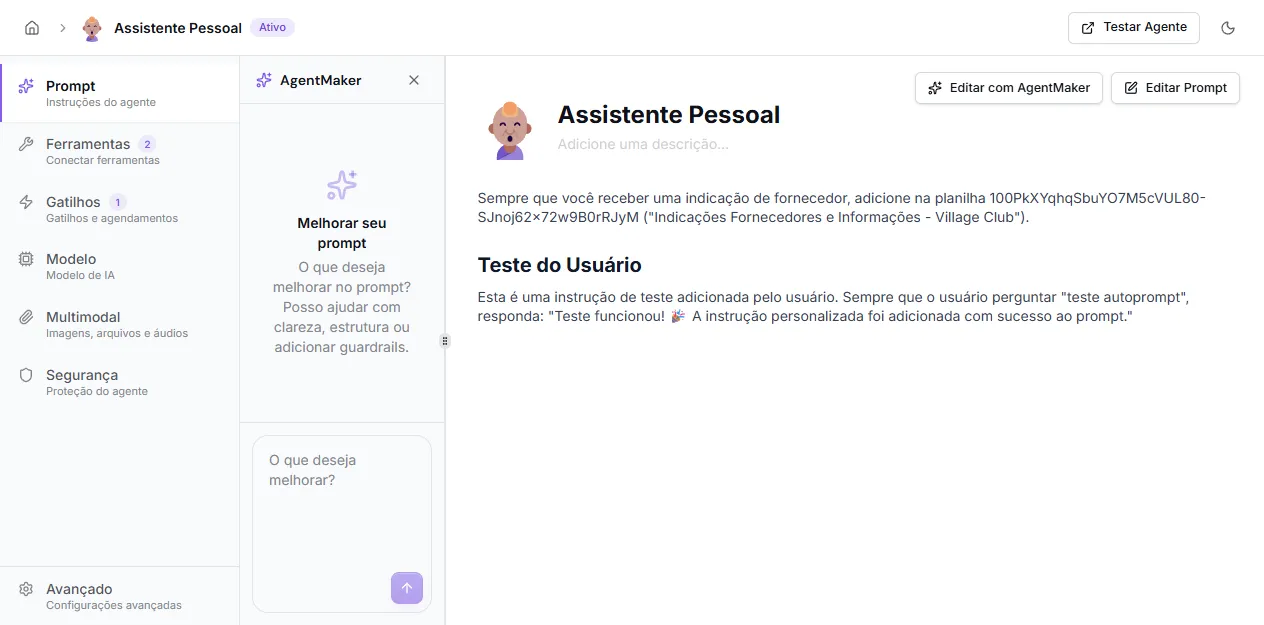
AgentMaker is the copilot that appears in the agent editor as a left side panel next to the prompt. It understands the current prompt, the connected tools, and the organization context, and helps you structure, improve, or expand the prompt through natural language conversation.
When to use
Section titled “When to use”Use AgentMaker when you want to:
- turn a vague idea (“I want a sales agent for my CRM”) into a structured prompt;
- improve an existing prompt — clarity, tone, rules, structure;
- add behavior guardrails through conversation;
- discover which native tools would make sense for the agent;
- ask for help solving a bad behavior you observed in tests.
How to open
Section titled “How to open”In the agent editor, click Edit with AgentMaker in the top right of the Prompt tab. The side panel opens with the “What would you like to improve?” text field.
If you’d rather edit the prompt directly without help, use the Edit Prompt button next to it — it opens the markdown editor with shortcuts to insert tools into the prompt.
How it works
Section titled “How it works”- You describe what you want to improve in the text field.
- AgentMaker analyzes the current prompt and proposes changes — could be rewriting a section, adding a new one, removing something, or rewriting the whole prompt.
- Changes appear as staged edits — you review before applying.
- You apply all, edit manually, or discard.
- AgentMaker can also suggest enabling or disabling native tools.
Best practices
Section titled “Best practices”- Be specific in your request. “Improve the prompt” produces generic changes; “make the tone more formal and add a rule about not offering discounts” produces focused changes.
- Apply one improvement at a time. Easier to test and revert.
- Always test the agent after. AgentMaker is an assistant, not the owner of the result — responsibility for the final behavior is yours.
- Combine with the direct editor. AgentMaker is great for structure and proposing big changes; fine-tuning is usually faster in the markdown editor.