
Connecting to Agents
Creating a base does not automatically connect it to the agent. For the agent to start consulting the content, you need to enable the native Search Knowledge Base tool on the agent and check which bases it can use.
Enabling the tool
Section titled “Enabling the tool”- Open Admin → Agents and click Edit on the agent.
- Go to the Tools tab.
- Click Add Tool.
- Under Native Tools, pick Search Knowledge Base.
The configuration panel opens on the right:
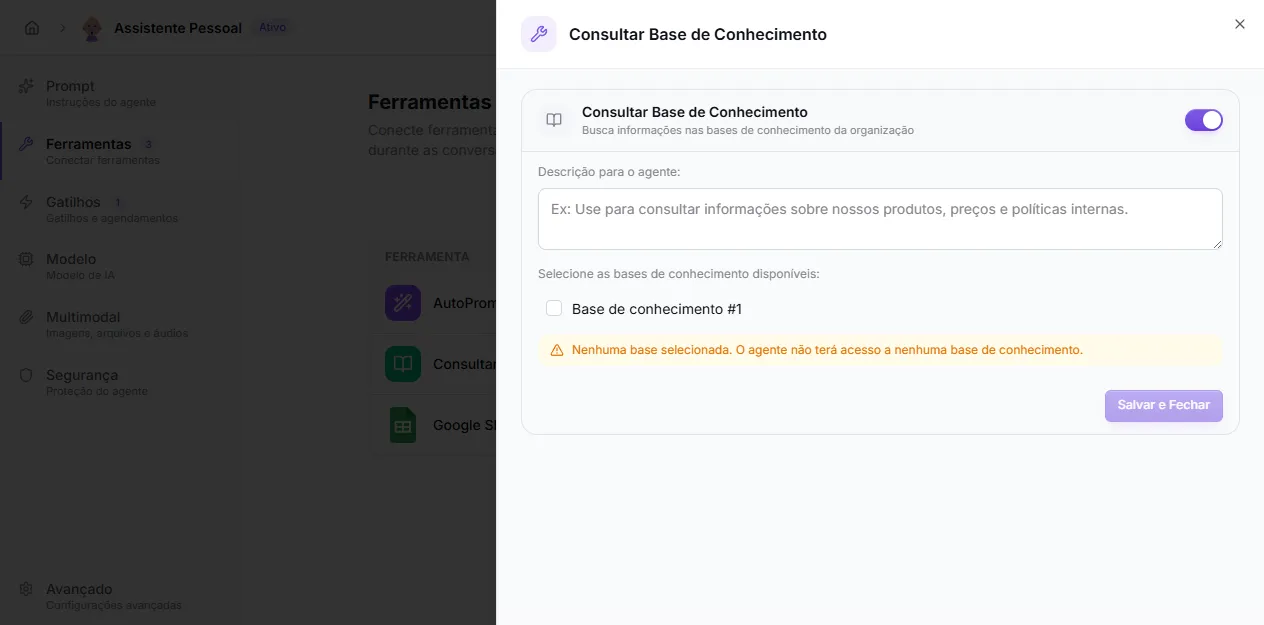
Configuring
Section titled “Configuring”- Toggle at the top — enables/disables the tool for this agent.
- Description for the agent (optional) — short instruction shown to the model when it decides whether to call the tool. Example: “Use to look up information about our products, prices, and internal policies.”
- Select the available knowledge bases — checkbox list of every base in the organization. Check one or more.
With no base checked, the yellow warning appears and the agent will have access to no base — the tool stays on but useless. Check at least one base before clicking Save and Close.
When to connect more than one base
Section titled “When to connect more than one base”Use multiple bases when the agent covers different domains — for example, technical support + commercial policies + product catalog. The agent receives relevant snippets from any checked base and answers based on what comes back.
If bases have very similar content, it may receive redundant snippets. In that case, reorganize the content or consolidate into a single base.
Guiding the prompt
Section titled “Guiding the prompt”The tool description helps the model decide when to call search, but the agent prompt is still the right place to make the policy explicit:
Use the knowledge base to answer questions about plans, policies, and setup.If the base does not provide enough information, say you could not find the answer and ask a clarification question.AutoLearn — capturing what is missing
Section titled “AutoLearn — capturing what is missing”If you also enable the AutoLearn tool on the same agent, every time it fails to find an answer in the base the question lands in Admin → Knowledge Bases → AutoLearn, ready to become new content. Details in Learning Opportunities (AutoLearn).
Validating
Section titled “Validating”After connecting, test in chat:
- questions with answers present in the base;
- questions similar but not identical to the indexed text;
- out-of-scope questions (to confirm the agent knows how to say “I don’t have that information”);
- questions that need to combine prompt and base.