
REST API and Tokens
The SquadOS REST API lets you integrate your agents, knowledge bases, and conversations with any external system. Everything the admin panel does can be done by an authenticated HTTP request.
What the API offers
Section titled “What the API offers”The API is at version v1 and covers four resources:
- Chat —
POST /api/v1/chat/{agentId}: send a message to an agent and receive a reply (with optional streaming). - Agents — list (
GET /api/v1/agents) and fetch by id (GET /api/v1/agents/{id}) the organization’s agents. - Conversations — list, fetch, update conversations and read messages (
GET,PATCHandGET .../messages). - Bases (knowledge bases) — full CRUD for bases and their items, plus
POST /api/v1/bases/{id}/queryto run a semantic search directly.
Quick list of available endpoints:
POST /api/v1/chat/{agentId}GET /api/v1/agentsandGET /api/v1/agents/{id}GET /api/v1/conversations,GET /api/v1/conversations/{id},PATCH /api/v1/conversations/{id},GET /api/v1/conversations/{id}/messagesGET /api/v1/bases,GET /api/v1/bases/{id}GET /api/v1/bases/{id}/items,POST /api/v1/bases/{id}/itemsGET /api/v1/bases/{id}/items/{itemId},PATCH /api/v1/bases/{id}/items/{itemId},DELETE /api/v1/bases/{id}/items/{itemId}POST /api/v1/bases/{id}/query
How to generate a token
Section titled “How to generate a token”Tokens are per organization and grant access to its resources.
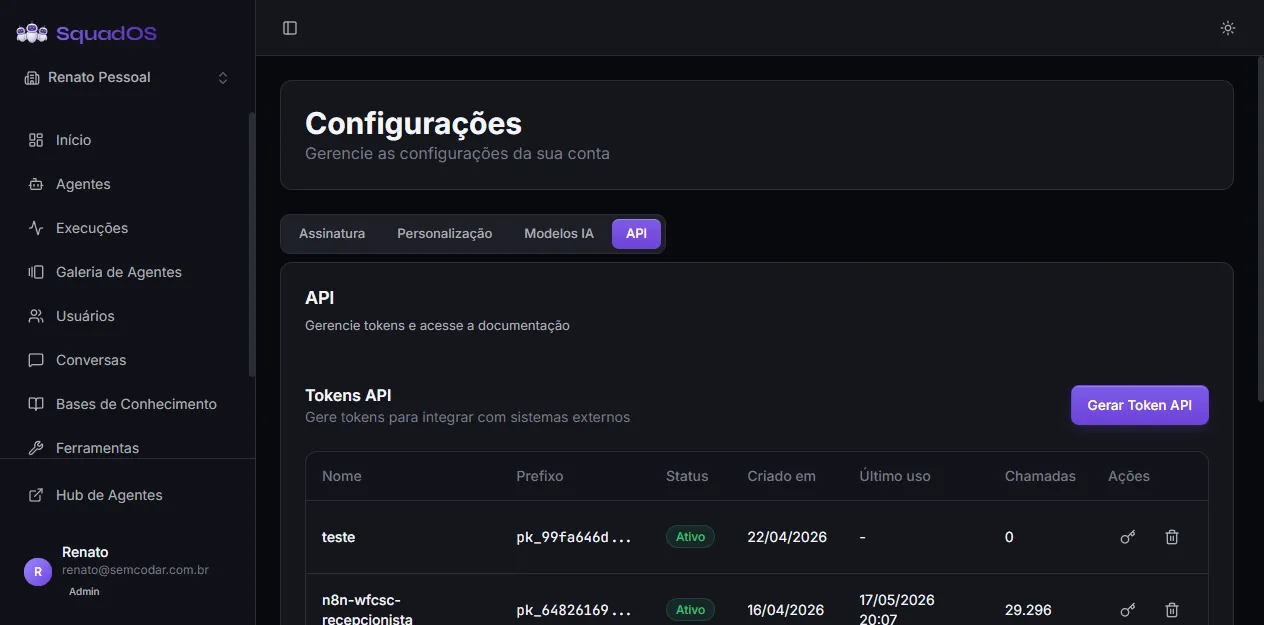
- Open Settings → API tab.
- Click Generate API Token.
- In the Generate API Token modal, provide a descriptive Token Name (e.g.
Marketing site integration). - Click Generate Token.
The full token appears in a second modal (Token Generated) with a yellow alert: “This token will be shown only once”. Copy it and store it somewhere safe (secret manager, vault, env var) using the copy button next to the field. After that the panel shows only the prefix (first 8 characters followed by ...) so you can identify the token.
Tokens have the format pk_<hex>. Only admins (or owners) can generate them.
Manage existing tokens
Section titled “Manage existing tokens”In the same tab, the API Tokens table lists each token with:
- Name;
- Prefix (e.g.
pk_99fa646d...); - Status (green Active or red Revoked badge);
- Created at (date);
- Last used (date/time, or
-if never used); - Calls (total counter);
- Actions (revoke with key icon; delete with trash icon).
Revoke disables the token but keeps the record and call history. Delete removes the whole record. Revoked tokens cannot be reactivated — generate a new one.
Authentication header
Section titled “Authentication header”Every call needs the header:
Authorization: Bearer pk_<your_token>Invalid or expired tokens return 401 Unauthorized.
curl example
Section titled “curl example”# List the organization's agentscurl https://<project>.supabase.co/functions/v1/api/v1/agents \ -H "Authorization: Bearer pk_your_token_here"
# Send a message to an agentcurl https://<project>.supabase.co/functions/v1/api/v1/chat/<agent_id> \ -H "Authorization: Bearer pk_your_token_here" \ -H "Content-Type: application/json" \ -d '{"message": "Hello, agent!"}'
# Semantic search in a basecurl https://<project>.supabase.co/functions/v1/api/v1/bases/<base_id>/query \ -H "Authorization: Bearer pk_your_token_here" \ -H "Content-Type: application/json" \ -d '{"query": "search term", "limit": 5}'OpenAPI documentation
Section titled “OpenAPI documentation”Just below the tokens table, the API Documentation section has an OpenAPI Spec button that opens the spec in JSON format (in a new tab). You can use this spec with tools like Postman, Insomnia, or to auto-generate clients.
Best practices
Section titled “Best practices”- Generate one token per integration (one for the site, another for the internal app, etc.) so you can revoke individually without affecting the others.
- Use descriptive names on tokens — the panel only shows the name and prefix afterwards.
- Never paste the token in client-side code (browser, mobile app). The REST API is for server-to-server calls.
- Revoke tokens immediately if you suspect a leak; the impact stays limited to the token’s organization.
- Monitor the Calls column in the table to spot dead integrations you can revoke.