
Conversation States
Every external conversation in the admin panel has a state derived from two fields: the conversation’s status (active, completed) and the AI enabled flag (ai_enabled). The combination of the two yields the three states surfaced in the UI.
The three states
Section titled “The three states”The conversation is in progress and the agent is answering automatically. This is the default state for any new conversation.
- How you get here: a new conversation starts here; a Completed conversation you reopen also returns to this state.
- How you leave: the agent enters handoff (becomes Human) or an admin completes the conversation (becomes Completed).
The agent is paused and a person is in control. Any new user message waits for a manual reply — the agent won’t respond.
- How you get here:
- An admin clicks Intervene in the chat header.
- The agent itself calls the Human Intervention tool, which flips
ai_enabledto false automatically.
- How you leave:
- Admin clicks Return (or Reactivate agent on API conversations) and the agent takes back control (back to Open).
- Admin clicks Complete and the conversation moves to Completed (with the agent reactivated for any future reopen).
See Human Intervention for the full flow.
Completed
Section titled “Completed”The conversation was manually closed by an admin. It no longer shows in the default list filters, but it stays accessible and can be reopened.
- How you get here: admin clicks Complete in the conversation header.
- How you leave: admin clicks Reopen in the header — the conversation returns to Open (and the agent is reactivated by invariant: you can’t reopen straight into Human).
Transitions — visual summary
Section titled “Transitions — visual summary” +--------+ | Open | <----- new conversation +--------+ | ^ | Intervene/ | | | Complete Handoff | | | v | v +-------+ +-----------+ | Human | | Completed | +-------+ +-----------+ | | Return | | Reopen v v +--------+ +--------+ | Open | | Open | +--------+ +--------+In summary:
| From | Action | To |
|---|---|---|
| Open | Admin intervenes or agent triggers Human Intervention | Human |
| Open | Admin completes | Completed |
| Human | Admin returns | Open |
| Human | Admin completes | Completed |
| Completed | Admin reopens | Open |
Completion always reactivates the agent — a conversation never ends in a paused state.
Filters on the list
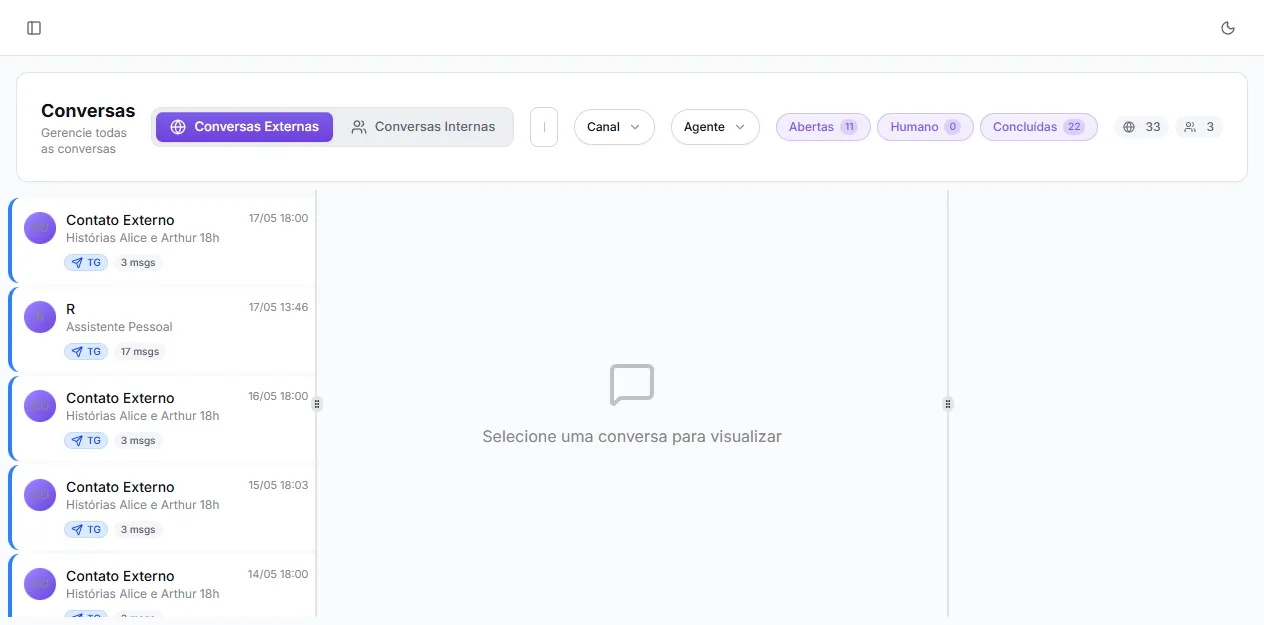
Section titled “Filters on the list”At the top of the External Conversations tab you see three pills with counters: Open (N), Human (N), Completed (N). They are multi-select filters:
- Click a pill to toggle whether it’s included.
- Selecting all three is equivalent to “show all”.
- The UI won’t let you deselect all — if you try to remove the last one, it snaps back to Open (the most useful default).
The filter is reflected in the URL (?states=open,human,completed), so a saved link preserves the view.
Visual indicators
Section titled “Visual indicators”- Conversations in human intervention show a yellow shield icon next to the user’s name in the list, and a yellow “Human” badge below the card.
- Completed conversations show a green “Completed” badge and swap the Intervene button for Reopen in the header.
- The channel (web, WhatsApp, Telegram, API, public chat) appears as a colored badge and a colored left border on the card — orthogonal to state, but handy for triage.
Good practices
Section titled “Good practices”- Complete what’s done. The Completed state keeps the Open list focused on what needs attention.
- Reopen instead of creating a new one when the topic is the same — preserves history and notes.
- Use the Human filter as your intervention inbox — those are the conversations stuck waiting for an admin to reply.
- Don’t let the Human filter pile up. Every conversation in that state is a user waiting — monitor at least once a day.